Wednesday, 19 December 2018

The floor

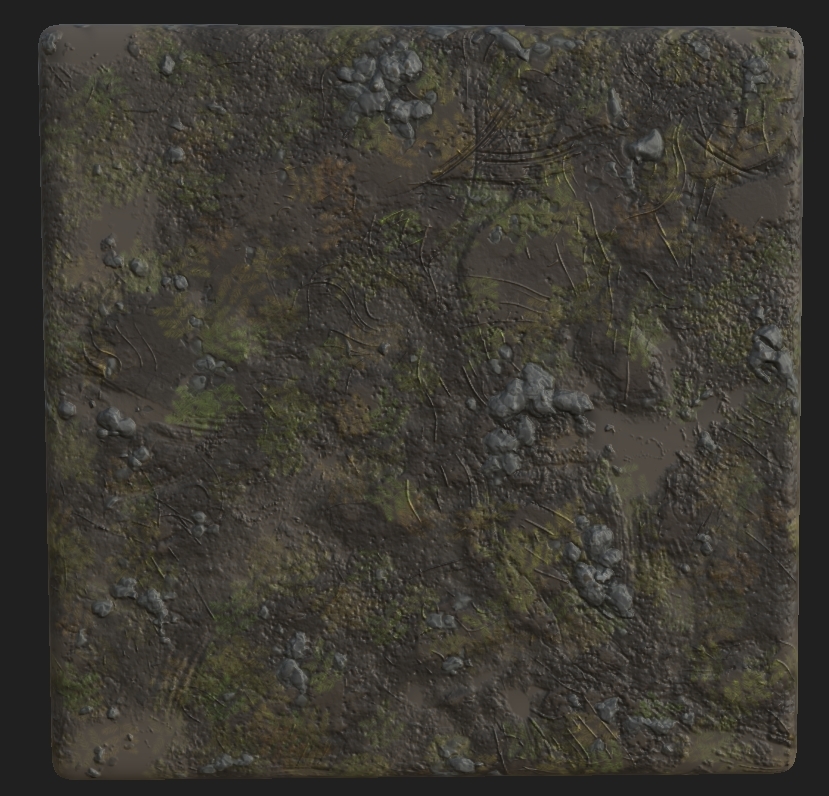
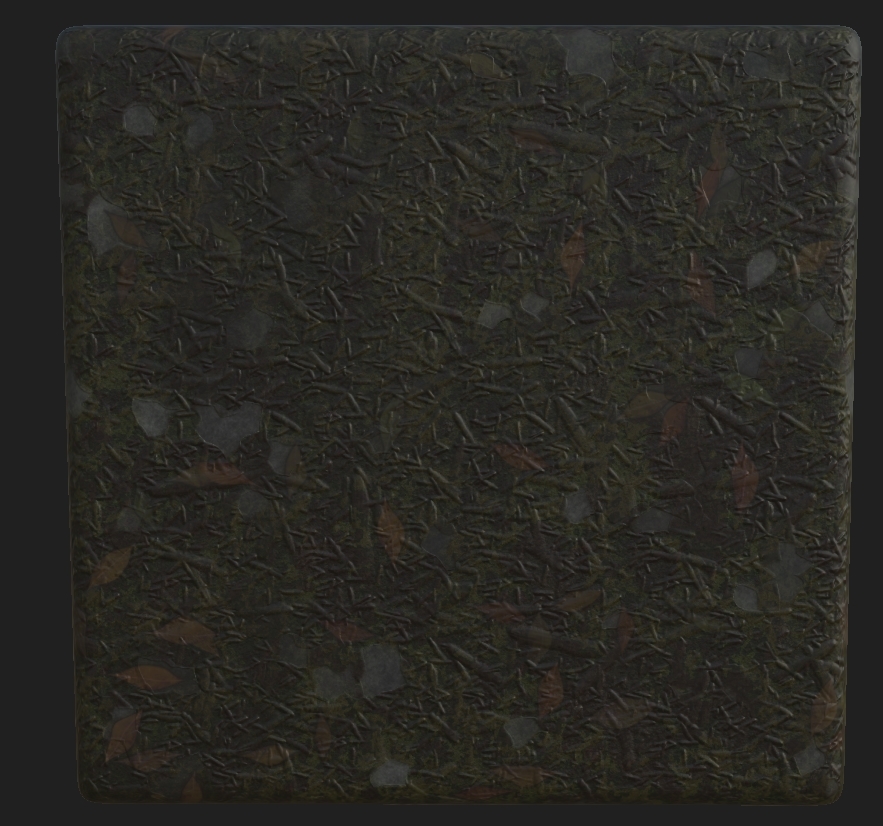
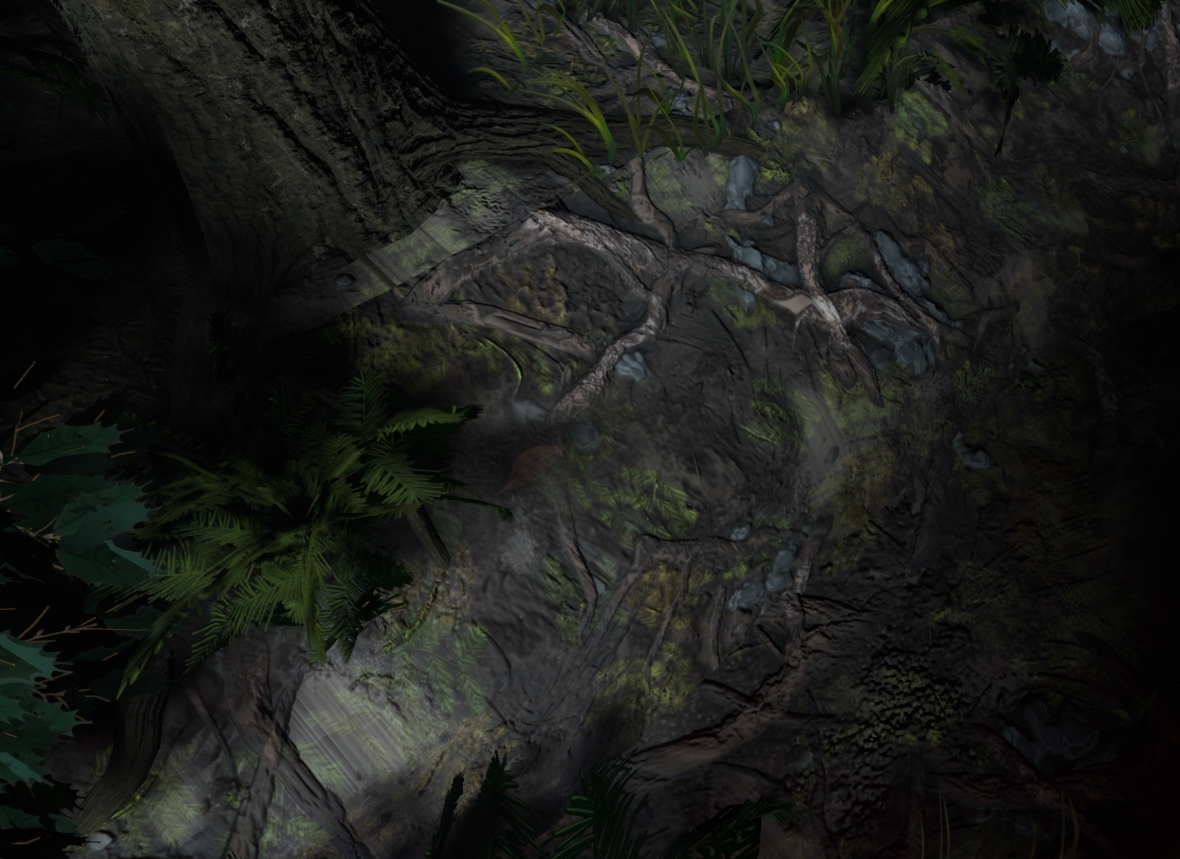
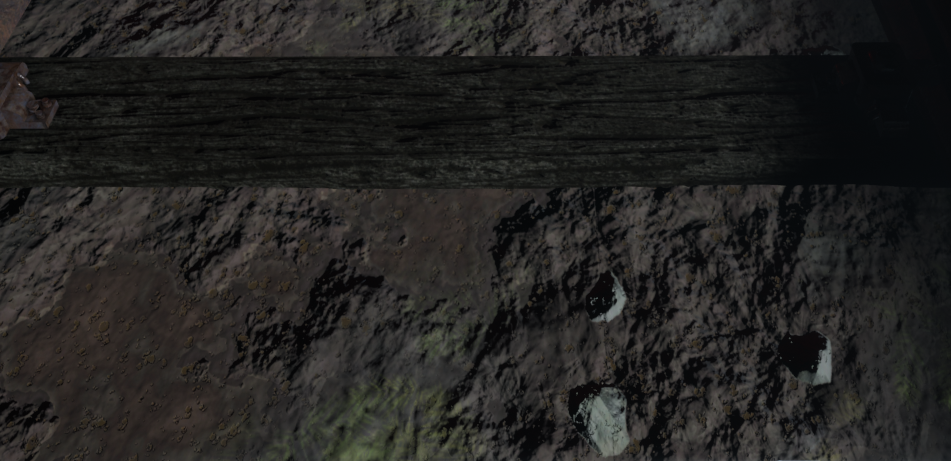
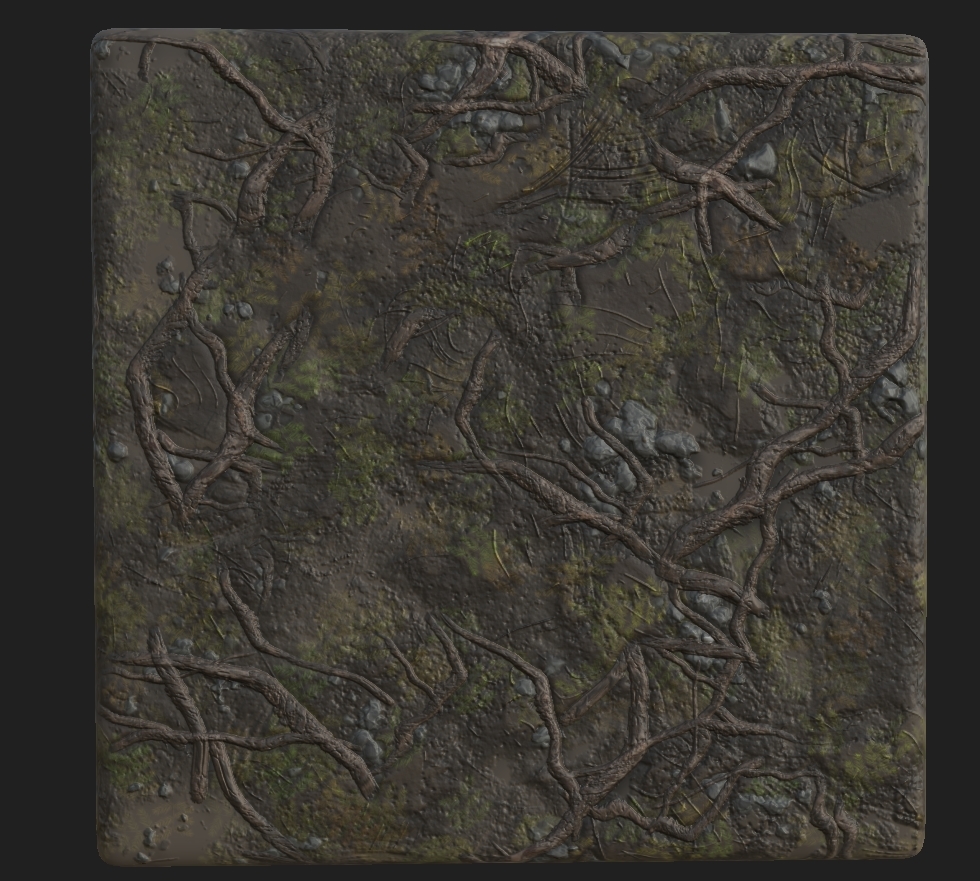
Coming now to the final parts of my scene, although this has been shown previous I managed to finish the floor. This was completely vertex painted on using 4 different textures. I used the RBGA channels to help manipulate this, the textures shown below are what they represent. Next to the texture is what channel they run through.

 = A

 = B

 = G

 = R

The last texture had it's color changed but when doing variations I managed to save over the old file with the correct colors. Either way, these 4 textures are what make up my whole ground base. The way I set this up was by creating a vertex paint material, it may look confusing at first but you will see where and how I approached this. Before we start, I had to package all of these using RMA packages and the setting the compression settings to Masks (No sRGB).

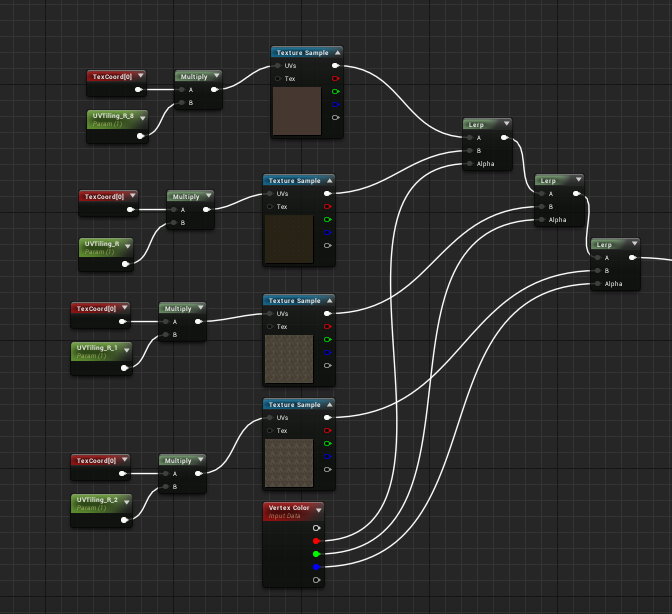
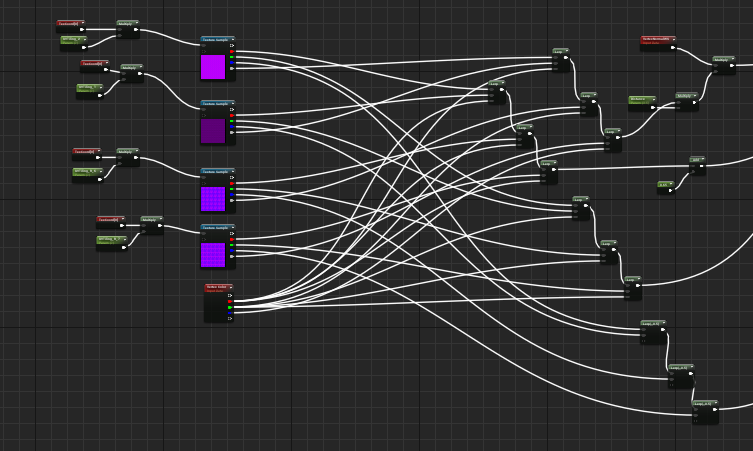
The way I first set this up was with non-packaged textures but realizing that UE4 can only hold 13 texture sets in one material I had to change this. I used a vertex color node alongside the textures which plugged into a lerp like shown below. The RGB channel from the vertex color are plugged into the lerps, but you may notice that there's 4 textures, 3 colors. The reason for this is that white (the first color) will be the initial base, as stated before I learned how to use that a little later than before because I thought it could just be painted on but instead I had to remove all the other textures and repaint it on. To the left you will see a TexCoord plugged into a multiply with a UVTilling parameter. This allows for the texture to be repeated a set amount of times and not have it be massive on the geometry. To finish this you would plug it into the base color.


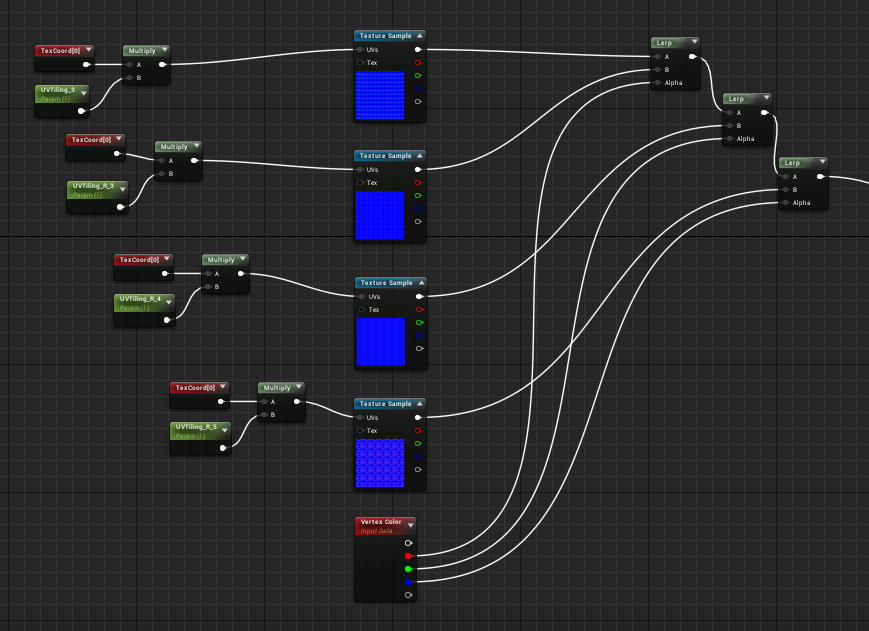
You would then repeat this process for the normals.


Now it begins to look complicated but actually it's very easy to understand, the way you set this up is the red channel you'd use would relate in terms of RMA(H) dependent on how you packaged it. I set mine up RMAH which is Roughness, Metallic, Ambient Occlusion and finally Height. You would then do the same process, plug the red channels into one lerp same as shown previous so that the material knows what channel to put through. The slightly difficult part was getting the height in, now the way I packaged them allowed for the white channel to be height. This doesn't effect the way the vertex color reads the material but instead the world displacement also known as tessellation. It's not really recommended to do it this way because of how heavy it could be but with such a small scene and trying to get a portfolio piece it was worth doing. So what you would do is the same way of setting up the old lerps but instead using the colors on the RMAH maps to tell the lerps which color the texture is then using the vertex color in the alpha to tell them the channel.


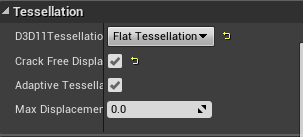
You then would make a parameter which is your tessellation multiplier and turn on tessellation in the details of the material.


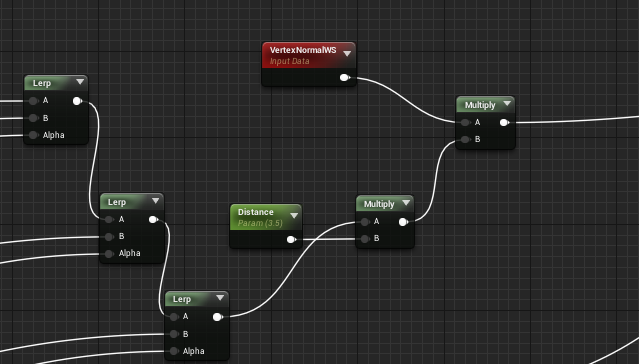
After this, you would then add in another parameter with a multiplier that comes from the last lerp to then join that to another multiplier with a vertexnormalws and plug that into world displacement. This allowed for the tesselation to work the way I wanted and the ground textures work perfectly in-engine and make the scenes composition work.


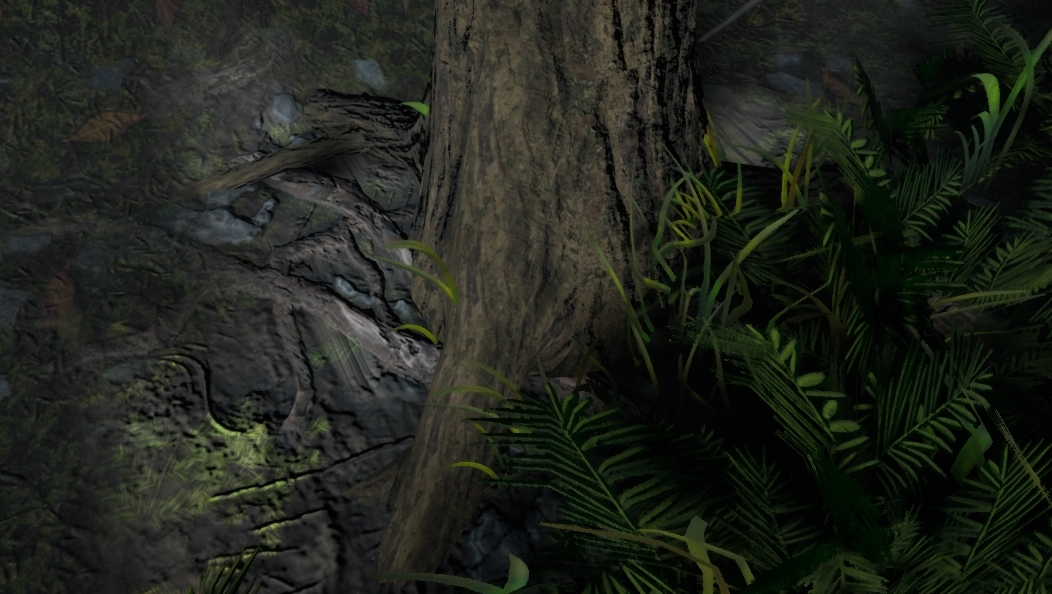
As for the final image the scene as a whole will help with that but I'll showcase some closeups of where the textures are working perfectly as well as how the overall scene works with the textures. Other than that, the vertex painting was completed by brush in-engine and from there I completed the scene as this was one of my final steps.


Feedback

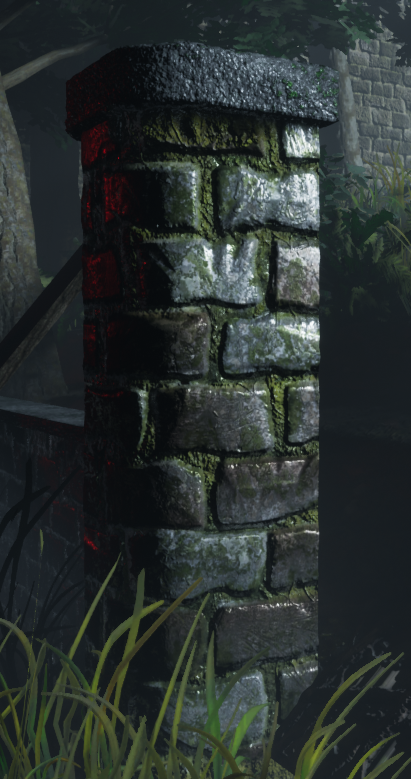
So after working by myself constantly using the references for feedback I then went and asked 4 different people on feedback, these all being industry workers (my lecturers). I showed them the base scene and asked how it could be fixed both texture wise and geometry. So to start off I chose to talk to my UE4 expert lecturer George who instantly sat down and told me what needs doing. He started off by saying that the normals on the wall recently made were too high and that I needed to bring it back a bit, I could either do this using the Flatternnormal node in UE4 but decided against that because it would be easier and more productive to do it in the texture itself, changing the texture to look like the image shown below.


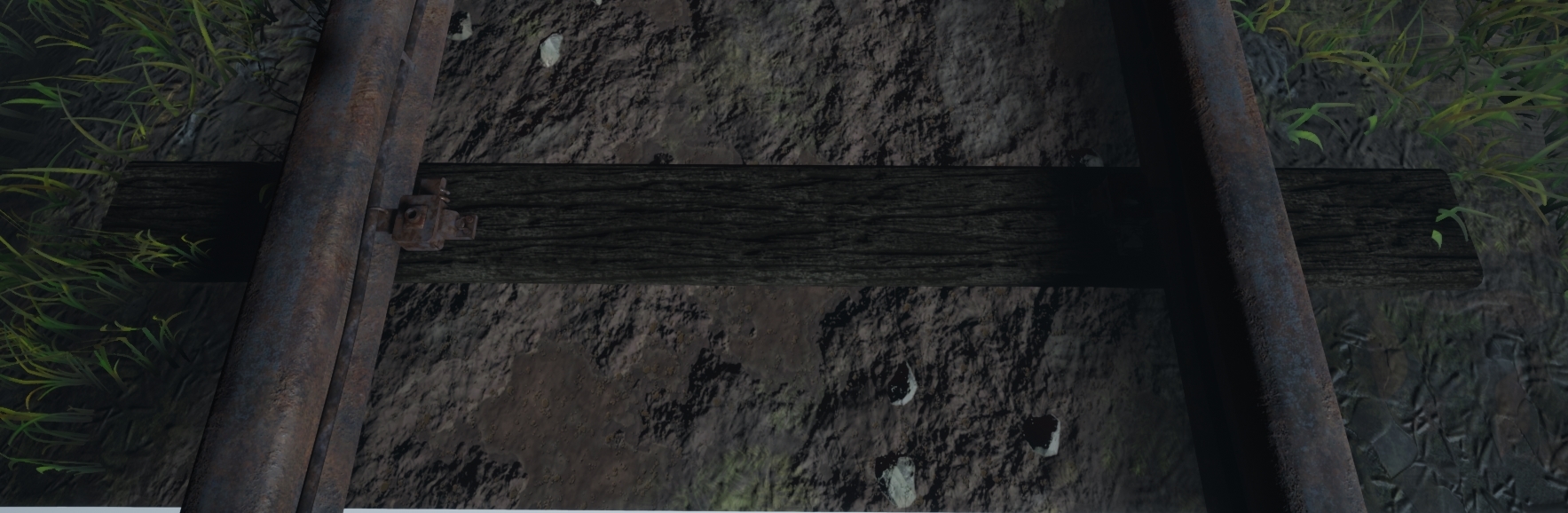
Next I was ordered to make the train track look more realistic, the colors were too bright for my scene (I also thought this but I didn't get round to changing it before the feedback session) alongside the sleepers which if you look at the Substance Designer part of my blog will see a lighter wood in comparison. I done this again but purely changing the texture colors as well as adding minor details to the wood as well as some form of train markings on the rail to showcase trains previously 'riding' the rail.


Lastly he helped me with the vertex painting graph which for some reason wasn't showing any of the white channel paint, he then explained to me that could would have to erase color rather than drawing over old colors for it to work letting me get a better understanding of how it works. This made me go back and work on the overall tiles that were needed as well as all the masked materials in there, redoing them and making them fit the scene better.

My next lecturer Roger who was the one which helped with lighting informed me that the older versions of lighting were making too much noise in the scene, meaning that I needed to turn down all the settings to make it work. The way I went about this was actually a smart but also risky way of doing it. I have fog in the scene which the light passes through, this meaning that they ray through the fog (image shown below of previous and new).

Old.


New.


The idea behind it was to bring down the intensity of the light but also maintaining the rays as well as lit backgrounds and fog. I done this by actually creating a completely seperate fog material and changing the color to a darker grey which in turn shows less light coming through but also keeps the fog in place but instead with a grey contrast (the way fog would sit in darkness). As you can see in the image below, as the forest becomes more dense it becomes more of a grey color rather than white. This fix was simple and effective, this doesn't effect anything seeing as I already had the displacement fog already there just instead had it white meaning no performance was gained or lost.

Image result for fog dark forest

Aside from this he said that the shadows were too dark in places, this is where I found out about 'Subsurface scattering' or 'Translucency'. This is where you have a alpha card and have light travel through the card and scatter the light as if it were like light in real life. It uses the translucent object to grab the light and make it transferable through the object and emit light to where the light would normally bounce to. Shown below is a image of this.
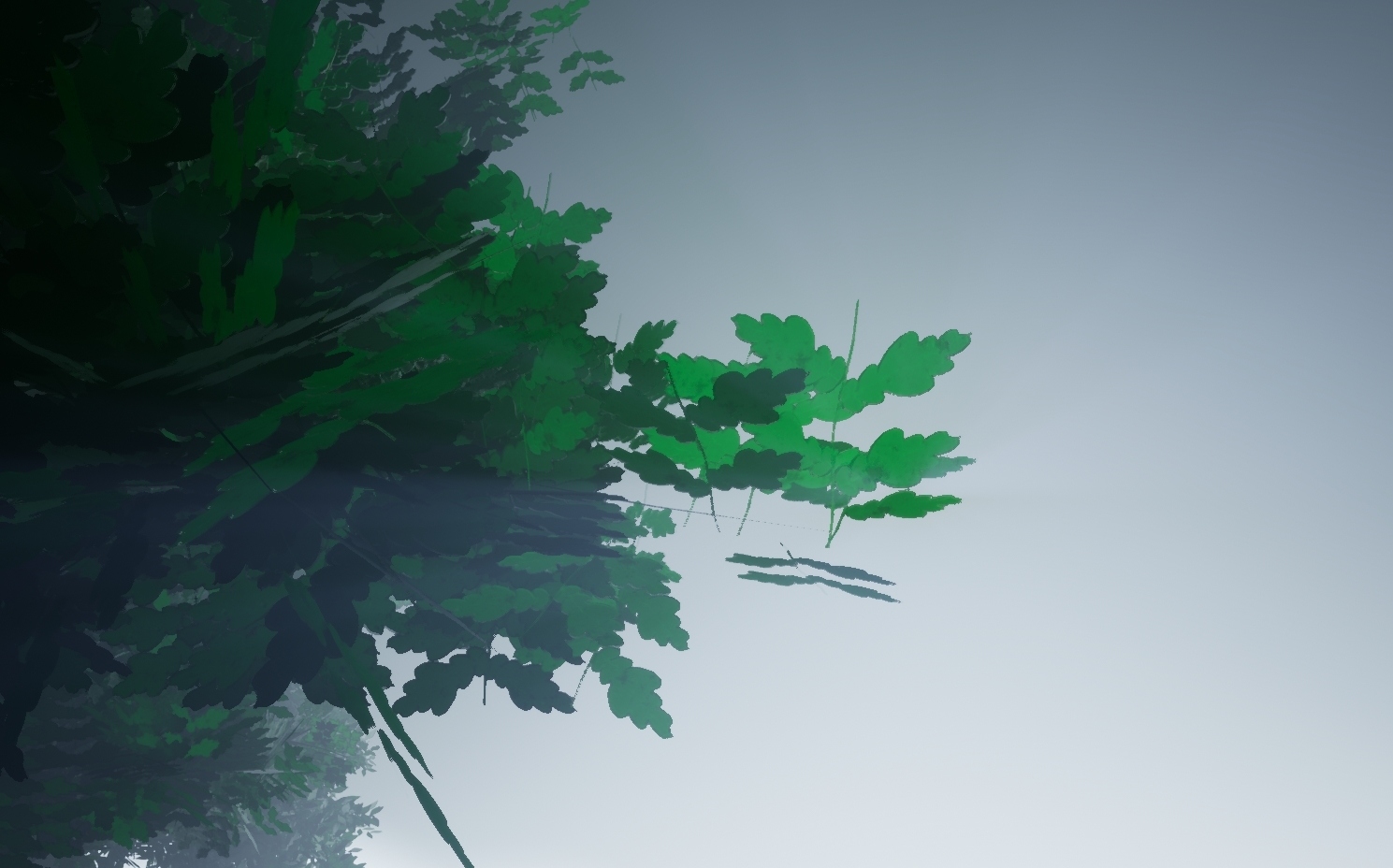


As you can see from the image, the more dense the tree becomes the less light travels through meaning that the shadows can have a blurred effect as well as more light in the scene. The way I managed to do this was through UE4 and using the settings in there to set it up as the SpeedTree version wasn't working in engine. Below is a image of how I set it up. I also changed the materials shading model to Two Sided Foliage so that way we can have more of a lit effect.
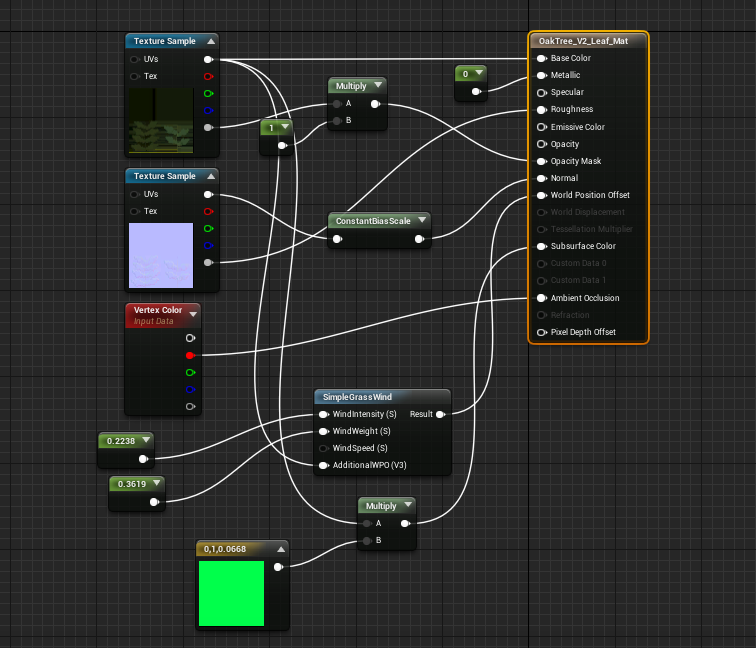


(This setup was shown in a previous blog post but knowing now that it helps lighting has increased my understanding of why it's used and how)

I then went to Chris who told me to break up the green and darker colors with something more colorful, although this is meant to be a rail road coming to a end I decided to have the final life of a light still running. This allowed me to mess with more lighting as well as different colors. Although you can see this previous in Rogers images it was done previous but I saw Roger first in terms of who gave me feedback and in what order. Some images are from being a week ahead of myself in terms of blog work. The reason I chose to have this light at the end of its life is because it would mean the bulb below it would be burning out as well as the intensity would still be quiet high (as it would have been maintained one last time before being condemned). The writing on it is from a link that Ronald (another lecturer of ours who was in the steel industry) had sent me about signs and what they mean on rail roads (https://www.rssb.co.uk/rgs/standards/gkrt0033%20iss%203.pdf). The first miniature sign means single rail road ahead and then the second sign is the license plate of that sign so if there was a fault they'd know how to locate it immediately. These minor details are the parts which bring the project together showing that it's soon to be a shut down rail road.
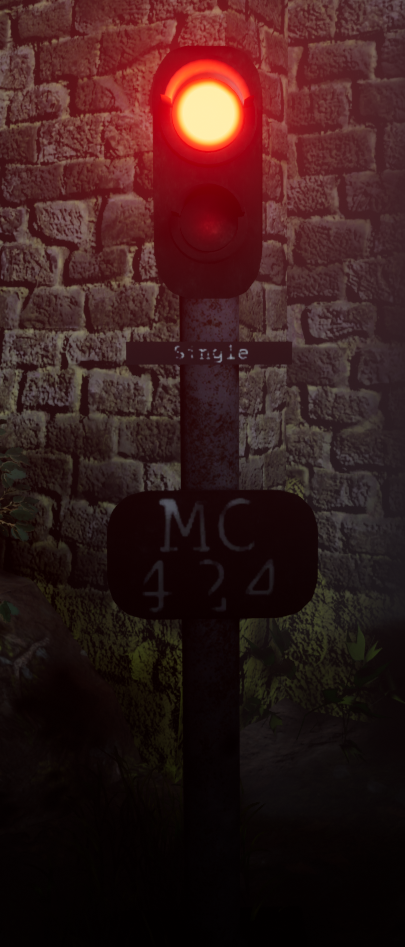

Other than this a few of the same things were said about the wall texture as well as adding some element of story which hopefully this brings. The way I went about making the light was using 3 point lights, one massive coned high intensity to make the red visible in the scene, one facing back onto the object and using my lightmap to block out the red from the wall behind and then a dim one for the bulb below the intense bulb.

Lastly Mark my final lecturer that I had asked feedback from was very helpful in terms of the overall scope and idea of things. He was the one to mention that fact that there was not much variation in terms of tree, grass and even shrubbery. This was the information I was looking for all along as in the back of my head I wasn't happy until I made these changed. This meant making more variations of the same textures/trees as well as height on some parts of the grass and variations of the ferns. After discovering the concept of hiding things within a scene I decided to add in major detail to take the eyes off of these parts. I decided to add in depth to the scene by adding foliage all the way across the scene as well as the amount of variations. I decided to do this and replace the assets already in place to bring more colors to the scene. The image below shows you the different colors made for the pine tree which dominates the left side of the scene, hopefully the light will work perfectly and fool the eye thinking that some of the distant trees are different colors rather than the same as the ones shown in the front.
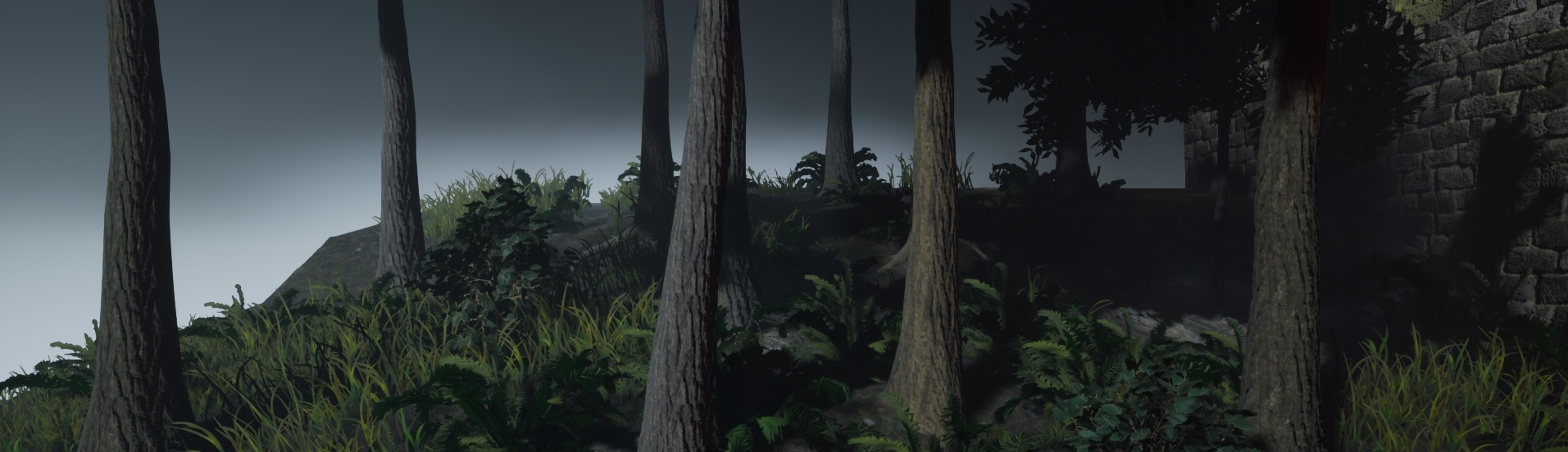


I done the same with the ferns, some are a darker green than others. The reason for this is so there's a difference as well as different levels of light. As for the grass I just ended up changing the size around, with this the colors looked as if they were changing colors unless you were to look really close. These tactics have saved so much on performance but if I was to make this for a game it would be done differently dependent on how much performance I'm allowed to take up. Other than this, variations in the wall were made that aren't in the overall screenshot but for detail for other screen shots such as bricks missing with small plantations growing out shown below. This overall key feature allowed for my scene to have variation in the screen shots also. Shown below is imagery of that.
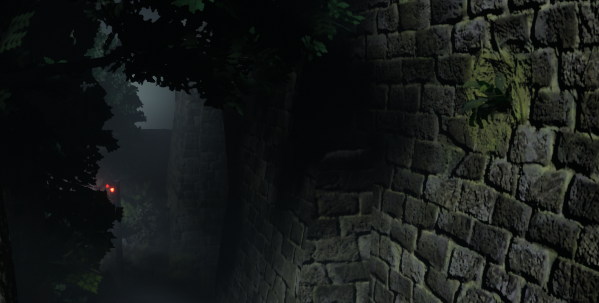


With all of this feedback I believe it has improved my scene 10x better than before. Especially because of the overall feel of the scene, I wouldn't of noticed much of it due to lack of experience which I've now developed across this project noticing that research is the key fundamental to forming a scene.

References:

Julie, T. (2018). Picalls.com | Fog in the Forest by Traveling Julie.. [online] Picalls. Available at: https://picalls.com/fog-in-the-forest-by-traveling-julie/ [Accessed 19 Dec. 2018].
Vegetation

Throughout the project I've needed a lot of vegetation seeing as it is in fact in a forest. The Missouri forest as stated before has lots of vegetation especially on the western areas. My goal was to create 4-5 variants of tree as well as 3-4 variants for the ground to have shrubs/bushes. Starting this off we have the White Oak Tree specified before, a tree that stands at 60-100ft (18-30m) which is scaled correctly in this scene. The trunk itself is around 2-3ft (0.6-0.9m) and again this is scaled to size in Speedtree. I chose to do everything to scale because my scene will be big enough and dense enough for it all to fit in perfectly. Especially seeing as all the trees I've chosen for this project will be around the same height if not significantly smaller or bigger dependent.

Sassafras, a tree found within the western province of Missouri's forest is predominantly found in the eastern side of North America is another tree that I will be adding to my scene because the overall detail on the leaf and the twin trunk that normally occurs with these trees will help me sort out my scene in terms of 'filling' therefore it will be less of a primary asset and more filler. The Sassafras like the Oak grows to around 49-66ft tall (15-20m) meaning it's a slight bit under the size of the Oak but we can make it work and distinctive enough for it to fit into the scene. These tend to grow around or near the Oak trees because of the spacious room left around the Oak from its dominant canopy. Hence why this was used in the scene.

The Green Ash Tree is a single trunk thinned tree meaning smaller trunk large canopy. They tend to grow around 50-60ft (15-19m) which for such a short trunk allows for them to grow in small gaps and then spread their canopy once fully grown. This means it can fit perfectly into my scene seeing as the smaller gaps can be filled with this tree as well as anywhere that seems 'naked' can be filled in with this tree.

The Shortleaf Pine, the final tree in my collection is the most dominant of all of the trees within the Eastern North America especially in the Missouri forests. The tree itself has a very high up canopy in comparison to the others meaning that its canopy doesn't grow properly on the bark till around 80% of the way up. This means that it can grow in mass amounts in such a small area and like said before dominating the land, meaning that this can be a massive part of my scene seeing as I need to fill out the more 'hilly' side of my scene. They tend to grow again to around 100ft (30m) which as you can tell aside from the White Oak is the tallest of the bunch, the reason I've included where I have is due to its sheer nature of taking over the land meaning it works perfectly and can easily have variations.

As for the floor vegetation we are starting off with the basics that you would see in any forest, the Fern. Ferns are a leaf like plant that dominate the floor of most dense forests that have natural stems, leaves and even sometimes connect to smaller tree roots or trunks. The reason I chose this especially is because the Missouri forest is covered in them due to the dense amount of trees. The ferns tend to grow due to spores so you'll find a lot of them lying next to each other. This again allows me to use these in excess with variations to fill out my scene. This is why I chose this as the first plant.

The next floor vegetation is the Hawthorn bush, although I didn't add the berries to the bush the leaf shape and overall shape of the bush is heavily referenced from the bush itself and drawings of it. Although my leaf has more points it's the same concept giving off the look of a Hawthorn bush. The bush grows around the ferns and along the forest floor but not in pairs or clusters but primarily by itself and growing out and expanding itself rather than relying on others to grow around it. Sometimes you'll find two or three near each other but that is because they normally stem from their main stem and landscape from their main stem.

Lastly I just gathered some images of flowers from the forest floor (unsure of the names) but I saw they grow around mossy/dirty areas and decided to add them in-between the rails where moss would grow. These last ground floor flowers/plantation were the final piece of vegetation to go into the scene. Aside from this every other piece of green will be either moss or grass. The moss itself will be a texture and the grass the same as the flowers a alpha on the floor. All of this research was necessary as it set the height boundaries of my scene as well as what grows where/where things are to be place in the scene. Without it the scene would be completely incorrect in terms of placements.

References:

Shortleaf pine:

https://www.fs.fed.us/database/feis/plants/tree/pinech/all.html

Green Ash Tree:

https://www.arborday.org/trees/treeguide/TreeDetail.cfm?ItemID=1070

Sassafras:

https://en.wikipedia.org/wiki/Sassafras_albidum

White Oak:

https://www.woodlandtrust.org.uk/visiting-woods/trees-woods-and-wildlife/british-trees/native-trees/english-oak/

Fern:

https://mdc.mo.gov/conmag/2003/03/missouri-ferns

Hawthorn bush:

https://nature.mdc.mo.gov/discover-nature/field-guide/hawthorns